
So you’re here because you’ve finally grown tired of always standing up to switch your lights on/off. It’s no news that lighting has evolved far beyond a simple on-and-off switch. And if you’re not yet on that bandwagon, you’re seriously missing out.
Thanks to smart home lighting systems, now you can control your lights from your phone, automate daily routines, and create the perfect ambience. The best part is that you can do all these while saving energy and money.
If you’re new to smart lighting, don’t worry. This beginner’s guide will walk you through everything you need to know. Our goal: to help you understand how smart lights work and set up your first smart home lighting system.
Excited? You better be, cos we’re diving in.
What Is a Smart Home Lighting System?
In simple words, a smart home lighting system is a modern, connected way to manage your home’s lights. No more relying on manual switches. Now you can control lighting through apps, voice assistants, or automated schedules.
Sounds like science fiction for our great-grandparents.
Since it’s a system, it’s not just bulbs. The system can include switches, sensors, and hubs that communicate with each other through Wi-Fi, Bluetooth, or Zigbee. In short, it’s lighting that listens, learns, and adapts to your lifestyle.
Here’s how it works:
- Smart bulbs contain built-in chips that connect to your home’s Wi-Fi network or a dedicated hub.
- Smart switches and dimmers allow you to control existing light fixtures without having to replace bulbs.
- Sensors detect motion or daylight to automate the timing of when lights turn on or off. (AKA hands-free lighting.)
You can control everything from a mobile app, a voice assistant like Alexa or Google Home, or through pre-set “scenes” that automate how and when your lights operate. Don’t worry, we’ll get to these one by one as we go further down.
Benefits of a Smart Lighting System
Smart lighting combines convenience, efficiency, ambience, and security in one package:
- Convenience: Turn lights on/off or dim them without leaving the bed or sofa.
- Efficiency: Save energy by scheduling lights only when needed.
- Ambience: Adjust colour temperature and brightness for the perfect mood.
- Security: Simulate occupancy with lighting schedules or sensors when you’re away.
These might seem a lot, but hey…
For beginners, the goal isn’t to rebuild your entire lighting setup overnight. It’s about starting small and discovering how simple changes can transform the way your home feels and functions. Building massive, complicated setups can wait.
Why Switch to Smart Lighting?
Smart lighting isn’t just about jumping on the trend and the hype train. It’s a practical upgrade for modern living. Let’s break down the key reasons why more UK homeowners are making the switch… and why you should too.
Energy Efficiency That Saves You Money
Having a traditional light turned on with no one actively using it is a waste of precious (and expensive) energy. But with smart LED lights and automation, you can drastically reduce that waste.
For instance, you can schedule your hallway lights to turn off automatically after midnight, or use bulkheads with motion sensors so they activate only when someone passes by.
Combining LED efficiency with smart automation helps lower electricity bills while extending the lifespan of your bulbs.
Control from Anywhere
We’d all left the house and wondered if we left the lights on. With a smart home lighting system, that’s no longer a concern. You can check and control your lights through your phone… even when you’re not home.
And the best part is integrating your lights with voice assistants like Amazon Alexa, Google Home, or Apple HomeKit. “Alexa, turn off the living room lights,” and it’s done. Now you have nothing to worry about while on vacation.
Remote access to home lights makes smart lighting perfect for travellers and busy families, and anyone who values peace of mind.
Customisable Ambience
What sets the mood of a space? It’s not the furniture or the wall paint. It’s your lighting. And smart lighting gives you total control over that.
You can adjust brightness, colour temperature, and even colour itself (if using RGB smart bulbs) to match any activity. This is perfect for multipurpose spaces, such as the living room.
Picture this:
- Bright, cool lighting for working or cooking.
- Soft, warm tones for a relaxing evening.
- Preset “scenes” for movie nights, dinner parties, or bedtime.
What’s even more amazing is that you can automate these changes. For example, schedule your lights to gradually brighten in the morning to simulate sunrise. Waking up naturally using artificial lighting? Now that’s something.
Safety and Security Features
Your home security is not limited to locks and bolts. Smart lighting can help protect your home even when you’re not there. Set schedules to mimic normal usage, making it appear as though someone’s home while you’re away.
When paired with motion sensors, lights can automatically illuminate dark areas when movement is detected. A perfect deterrent for intruders.
What You’ll Need to Build a Smart Lighting System
Creating a smart home lighting setup is easier than it sounds, but it’s doable even for a beginner. Here’s what you’ll need to get started.
Smart Bulbs and Fixtures
Smart bulbs are the simplest entry point. They screw into standard fittings (like E27, B22, or GU10) and connect to your Wi-Fi or smart hub. You can find a range from colour-changing bulbs to dimmable downlights from trusted suppliers like Simple Lighting.
These smart bulbs let you control brightness, colour, and timing directly from an app on your smartphone. Just make sure you get the bulbs that are compatible with your preferred smart system (like Alexa).
Smart Switches and Dimmers
You don’t always need to replace your lights to have smart lighting.
If you have multiple bulbs in one fixture (such as chandeliers or pendants with multiple bulbs), it may be more practical to install a smart switch or dimmer instead of replacing each bulb.
Smart switches control entire circuits, allowing you to manage all connected lights simultaneously. They’re ideal for large rooms or homes where you want a more centralised setup.
Sensors and Motion Detection
Adding motion sensors can elevate both convenience and energy savings. For instance, lights in hallways, bathrooms, or staircases can switch on automatically when someone walks by and off again when the area is empty.
These sensors are also valuable for outdoor security lighting, illuminating your driveway or garden when movement is detected.
Smart Hubs or Wi-Fi Systems
Many smart lights connect directly to your home Wi-Fi, while others use Zigbee or Z-Wave protocols, which require a hub.
- Wi-Fi-based systems (such as WiZ or Tuya) are easier for beginners since they require no hub.
- Zigbee-based systems (like Philips Hue) are ideal for larger setups since they’re more reliable and reduce Wi-Fi congestion.
If you’re new to smart lighting, start with a Wi-Fi-based system. It’s plug-and-play and beginner-friendly.
Apps and Voice Assistants
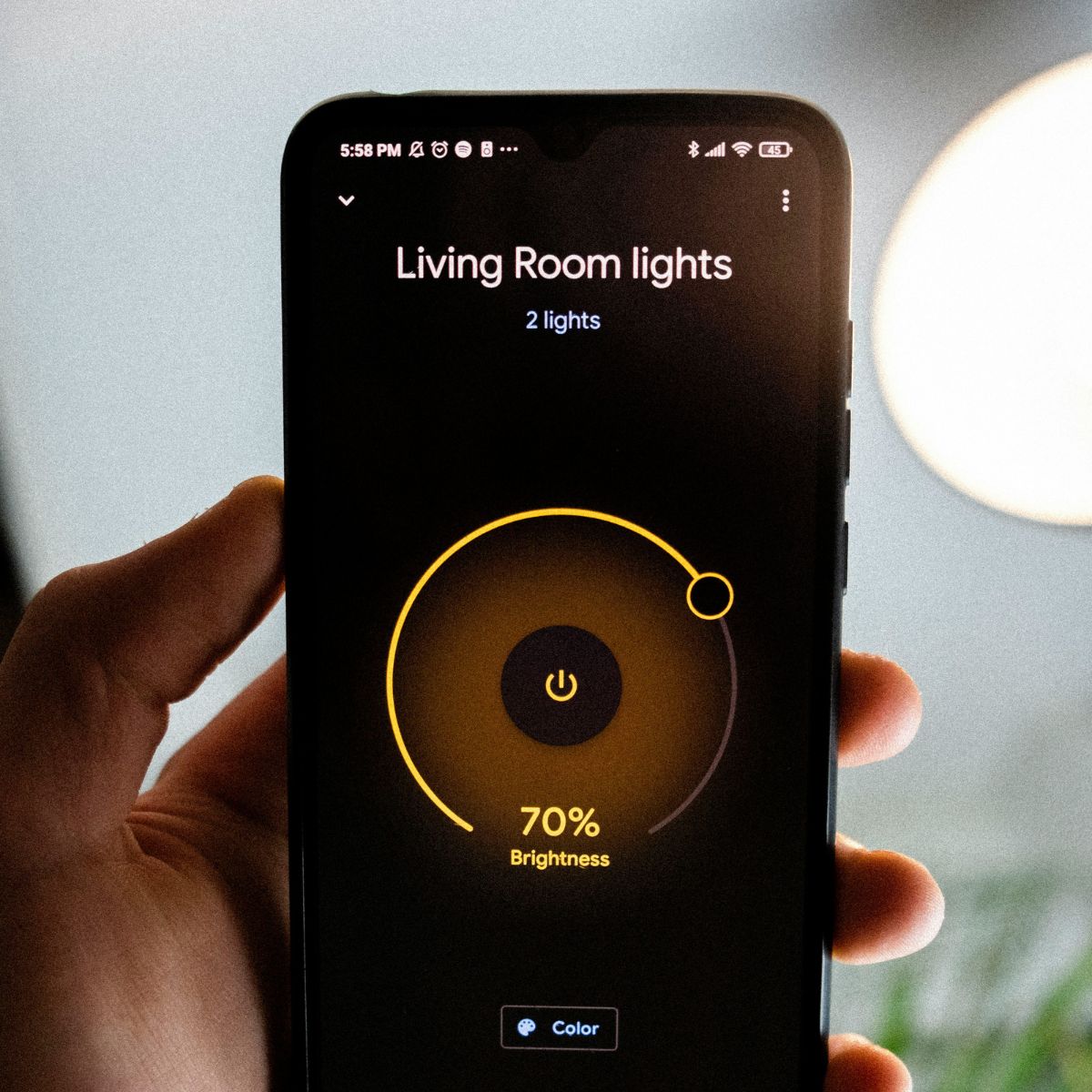
Every smart lighting setup comes with an app that lets you control brightness, colour, and schedules. Most also integrate with voice assistants:
- Amazon Alexa – “Alexa, dim the bedroom lights.”
- Google Assistant – “Hey Google, switch to movie mode.”
- Apple HomeKit – “Hey Siri, turn off the kitchen lights.”
These apps also allow you to manage multiple zones, group lights by room, and create automation routines for everyday tasks.
Step-by-Step: How to Create Your Smart Lighting System
Don’t let all the jargon get to you. Building your first smart home lighting system doesn’t have to be complicated. Here’s a simple, step-by-step guide to get started.
Step 1 – Start Small and Plan Your Lighting Zones
You don’t need to go big right off the bat. Begin with one room or key area, like your living room or bedroom. Consider where you spend the most time and where smart control will have the greatest impact.
Map out “zones” or areas you’d like to control separately, such as:
- Living room
- Ceiling lights
- RGB floor lamps
- TV bias lighting
- Kitchen task lights
- Bedroom bedside lamps
This planning stage helps you stay organised and expand easily later. This should also ensure that you do not become overwhelmed, as things can get complicated fast.
Step 2 – Choose the Right Smart Lights and Devices
Next, select smart bulbs and/or switches suited to your planned lighting zone.
Here are some examples to get you going:
- Ceiling downlights → GU10 smart bulbs
- Lamps → E27 smart bulbs or B22 smart bulbs
- Multiple ceiling lights → smart wall switches
Simple Lighting has a wide range of smart lighting options that are sure to fit your style.
Step 3 – Install and Connect Your Smart Devices
Installation is straightforward. Most smart bulbs simply screw in and connect through the brand’s app. Simply follow the instructions in the manual, and you should be good to go.
Here’s how it typically pans out:
- Download the recommended app (like WiZ or Tuya).
- Screw in your bulb or install the switch.
- Turn on the power and let the app detect the new device (you might need to tap on an “Add Device” or “+” on the screen).
- Connect the device to your Wi-Fi network or hub.
Once connected, you can name each light (e.g., “Living Room Main”) for easy control and management.
Step 4 – Customise and Automate Your Lighting
Here’s where the fun begins. Use your app to create lighting scenes and automations that match your daily routine.
Examples:
- Morning: Lights gradually brighten at 7:00 AM to wake you up.
- Evening: Lights shift to warm tones at sunset.
- Bedtime: All lights turn off (or dim) automatically at midnight.
Automation saves energy (both yours and electricity) while keeping your home comfortable and inviting.
Step 5 – Expand Your Smart Lighting System
Only start expanding when you’ve mastered setting up and using smart lighting in one room.
Things you can do:
- Add smart light strips for accent lighting behind TVs or under cabinets
- Install smart outdoor bulkhead lights for gardens and pathways.
- You can also integrate more advanced devices, such as motion sensors or door triggers.
Make your light react dynamically to your movement and schedule. Smart systems aren’t just “fancy lighting.” They are designed to grow with you.
Common Smart Lighting Mistakes to Avoid
See? Even beginners can successfully set up smart lighting. But a few common pitfalls can make the process more challenging than it needs to be. Avoid the following at all costs:
Ignoring Compatibility
Not all devices work with every app or hub. Before purchasing, check whether your bulbs and switches are compatible with your existing setup (e.g., WiZ, Tuya, Alexa, or Google Home). You can usually see their logos on the box or fixture itself.
Overcomplicating Your Setup
There’s a reason why you need to start small. Connecting your entire house to the system in one go, without prior experience and expertise, is a recipe for a lighting disaster.
Begin with one or two rooms to understand how the system works, then scale up confidently. No shortcuts!
Skipping Energy Settings
This may sound counterintuitive, given that we’re talking about installing smart lighting systems, but many people tend to overlook essential energy-saving features such as timers, brightness controls, or motion-activated controls.
Plan and adjust these settings early to maximise efficiency.
Pro Tips for Getting the Most from Smart Lighting
Once you’re comfortable with your setup, it’s time to make it truly work for you.
Experiment with Colour Temperatures
The colour of your light affects the mood and productivity of a space:
- Warm white (2700K – 3000K): Relaxing and cosy, ideal for unwinding in the evening.
- Natural / Cool white (4000K – 5000K): Energising and bright, perfect for task lighting in workspaces.
Many smart light bulbs allow adjusting colour temperatures. Experiment with these settings to see how lighting transforms your atmosphere throughout the day.
Use Voice Commands for Convenience
Controlling your lights with a few taps on your smartphone is more convenient than manually switching them. But you know what’s more convenient? Voice controls.
They make smart lighting effortless. Try phrases like:
- “Alexa, switch lights to gaming mode.”
- “Hey Google, set the lights to 50%.”
- “Siri, turn off all the downstairs lights.”
It’s an easy way to add a touch of futuristic comfort to your everyday routine.
Set Up Energy-Saving Routines
Make your lights work with your routines. For example, if you always sleep at 11:30 PM, set all bedroom and hallway lights to turn off at 11:30 PM, or have outdoor lights dim after midnight for extra savings.
Light Smarter, Live Better
A smart home lighting system isn’t just about technology. It’s about comfort, control, and creating the right atmosphere for every moment.
By starting small, learning how smart lighting works, and gradually expanding your setup, you’ll discover how simple and rewarding it is to modernise your home. Smart lighting gives you the flexibility to light your life exactly the way you want.
It’s not too late to start working on your own smart lighting upgrades. Head on to Simple Lighting’s smart home collection and find everything you need to get started today!
More lighting tips and tricks await you at Smart Lighting Ideas for a Connected, Convenient Home.